React
Reat is a JavaScript library for building interactive user interfaces.
UI
The elements that users see and interact with on-screen.
Library
By library, it means React provides helpful functions (APIs) to build UI, but
- leaves it up to the developer where to use those functions in their application.
Part of React’s success is that it is relatively unopinionated about the other aspects of building applications.
- This has resulted in a flourishing ecosystem of third-party tools and solutions, including Next.js.
It also means, however, that building a complete React application from the ground up requires some effort.
- Developers need to spend time configuring tools and reinventing solutions for common application requirements.
Next.js
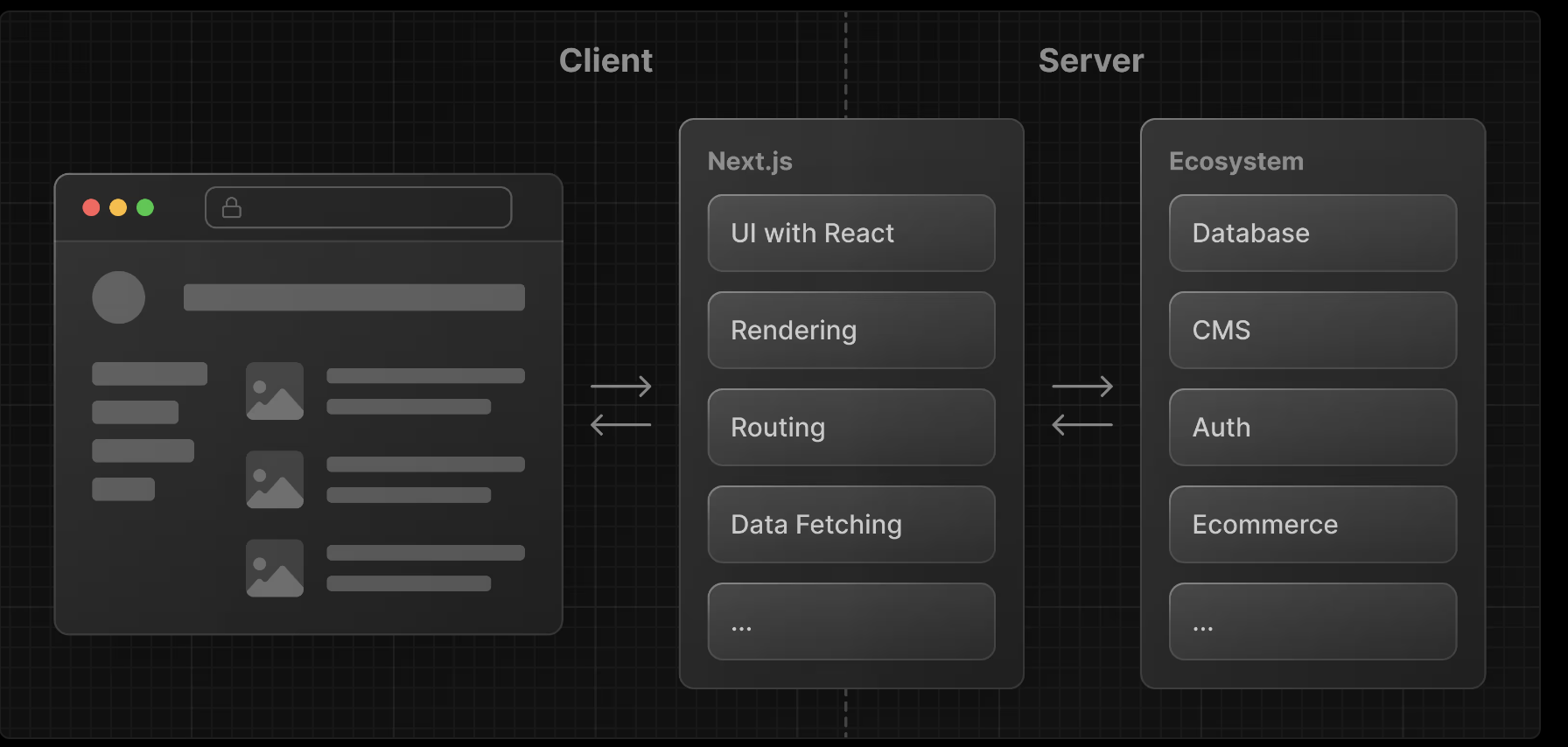
Next.js is a flexible **React framework** that gives you building blocks to create fast, full-stack web applications.
Building blocks of a web application
https://react.dev/learn/build-a-react-app-from-scratch
Core Architectural Considerations - When designing any software application, evaluate these 9 pillars:
User Interface
How users will consume and interact with your application (e.g., responsive design, design systems, accessibility, component libraries).
Routing
How users navigate between different parts of your application (e.g., client-side SPA routing vs. file-system server routing).
Data Fetching
Where your data lives and how to get it (e.g., REST, GraphQL, database queries, caching layers, server actions).
Rendering
When and where you render static or dynamic content (e.g., SSR, SSG, CSR, ISR, React Server Components).
Integrations
What third-party services you use (CMS, auth providers, payment gateways like Stripe) and how you connect to them securely.
Infrastructure
Where you deploy, store, and run your application code (e.g., serverless, containers/EKS, CDNs, edge functions, AWS cloud services).
Performance
How to optimize your application for end-users (e.g., Core Web Vitals, bundle size reduction, lazy loading, database indexing).
Scalability
How your application adapts as your team, data, and traffic grow (e.g., microservices, horizontal scaling, database sharding, caching strategies).
Developer Experience
Your team’s experience building and maintaining your application (e.g., TypeScript, linting, CI/CD pipelines, local testing suites).
For each part of your application, you will need to decide whether you will build a solution yourself or use other tools, such as packages, libraries, and frameworks.
Differences
The comparison between React and Next.js is a classic case study of unopinionated vs. opinionated software engineering.
Framing it as a rivalry is technically incorrect: Next.js is not an alternative to React; it is a full-stack framework built on top of React. Think of React as an engine and Next.js as the completed car built around it.
React (The Unopinionated UI Library)
React is strictly a library focused solely on the view layer (rendering UI components).
-
The Philosophy: Unopinionated and minimalist. React doesn’t care how you handle routing, structure your folders, connect to a database, fetch data, or build your backend.
-
How it renders: By default, it builds a Client-Side Rendered (CSR) Single Page Application (SPA). The server sends a bare-bones
index.htmlfile with an empty root<div>, and the browser downloads, parses, and executes heavy JavaScript bundles to construct the UI on the client. -
What you must provide yourself: Routing (e.g., React Router or TanStack Router), a bundler/build tool (like Vite, since Create React App is obsolete), state management, and an API server layer.
Next.js (The Opinionated Full-Stack Framework)
Next.js is an opinionated framework created by Vercel that wraps around React to provide a production-ready architecture out of the box.
-
The Philosophy: Convention over configuration. Next.js dictates how you organize your project folders, how routes are mapped, and how data is fetched.
-
How it renders: It supports multiple rendering strategies out of the box—Server-Side Rendering (SSR), Static Site Generation (SSG), Incremental Static Regeneration (ISR), and Client-Side Rendering (CSR). With modern React Server Components (RSC), you can mix server-rendered and client-rendered components within the same tree.
-
What comes built-in: File-based routing (via the
app/directory), automatic code-splitting, image and font optimization, API route handlers, and server actions.
Direct Comparison
| Feature | React (with Vite) | Next.js (App Router) |
|---|---|---|
| Nature | UI Library | Full-Stack Framework |
| Opinion Level | Unopinionated (Bring your own router, bundler, server) | Opinionated (Conventions for structure, routing, and deployment) |
| Default Rendering | Client-Side Rendering (CSR) | Server-Side Rendering / Server Components (RSC) |
| Routing | Manual configuration (React Router) | File-system based routing (app/ directory) |
| SEO Optimization | Challenging (crawlers see an empty HTML shell initially) | Excellent (delivers fully-rendered HTML instantly) |
| Backend Capabilities | None (Frontend only; requires an external API/Node backend) | Built-in via API Route Handlers and Server Actions |
When to Use Which?
-
Choose Next.js as your default for: Public-facing websites, e-commerce stores, SaaS marketing pages, blogs, and content platforms where SEO, initial page load speed (LCP), and Core Web Vitals directly impact business success.
-
Choose plain React (with Vite) for: Login-gated internal tools, complex admin dashboards, enterprise enterprise apps behind authentication, or embedded widgets where search engine indexing doesn’t matter and you want total architectural freedom.
References
https://nextjs.org/learn/react-foundations https://react.dev/learn/build-a-react-app-from-scratch https://react.dev/learn/creating-a-react-app#full-stack-frameworks