Summary
Tldr
Log
A log records one thing that happened with a timestamp and whatever extra detail the engineer who wrote that code felt like keeping.
Metrics
Metrics are numbers, sampled over and over, building up a chart you can look at.
Trace
The trace is the whole journey of one request, start to finish, across every service it crossed.
What are logs?
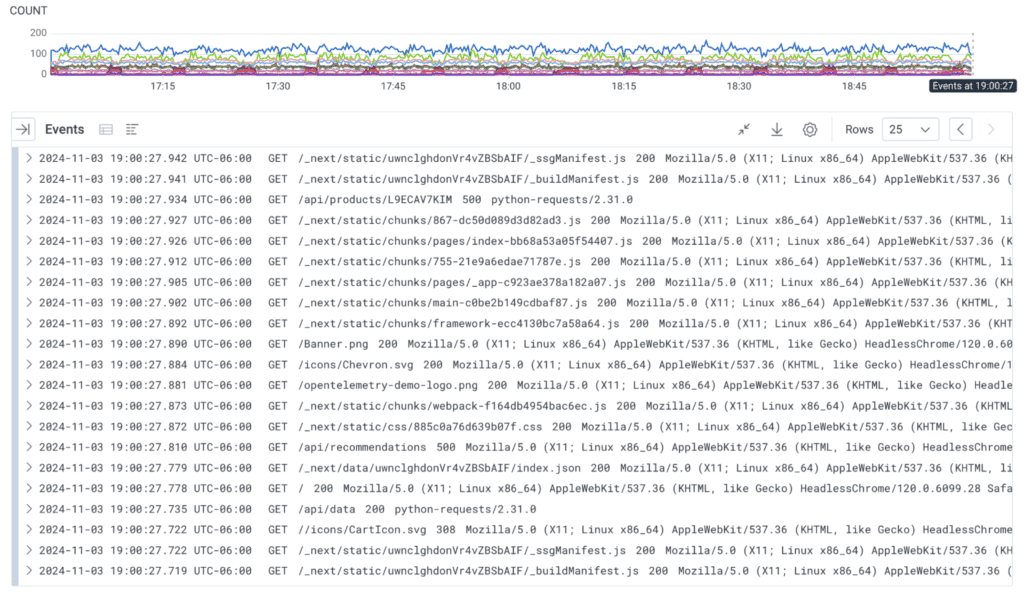
Logs are record of discrete events that happened over time Logs are time-stamped records generated by software applications, services, or network devices. They provide a sequential account of events that occurred within a system, including details of what happened, when it happened, and the state of the application during the event.
Types of logs
Different types of logs come from different parts of the software and serve different audiences.
- Application logs: Capture events related to application behavior, errors, and transactions.
- System logs: Provide information about the operating system, such as boot processes and system errors.
- Security logs: Track access and authentication events, helping identify potential security threats.
- Audit logs: Record changes and actions taken within an application for compliance and security purposes.
Use cases for logs
Implement logs to capture changes, actions, and errors. In summary, logs are used for:
- Debugging: identifying issues in system performance or functionality.
- Compliance: ensuring systems meet regulatory requirements through detailed logging.
- Monitoring: observing and alerting for specified system behaviors or errors.
Application logs can be used for debugging, giving developers and SREs some clues about how requests are served by the software. Each log is independent and describes an action or error in one software component.
Metrics
A set of numbers that give information about a process or activity
What are traces?
Traces are records that follow the path of a request as it traverses through various components of a distributed system. Distributed tracing provides a high-level overview of how different services interact, helping teams understand the flow and performance of requests across microservices.
Traces can hold all the information found in application logs, with additional data about how all the pieces fit together.
What are traces composed of?
A trace is made up of spans grouped by a trace ID. A span represents a unit of work, some operation performed by a service. Each trace has one root span, which has the total latency of a request. That parent span can contain nested spans to represent sub-operations within a request. These nested spans are known as child spans.
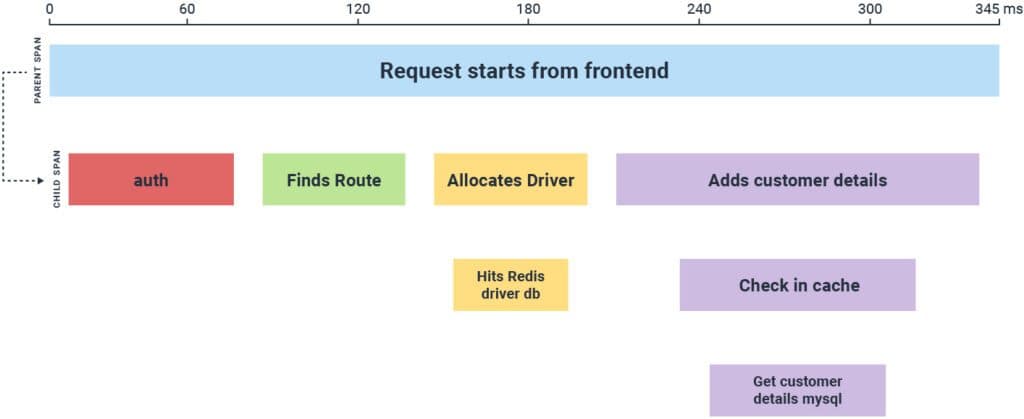
In OpenTelemetry, spans include attributes of the following information:
- Operation Name: a descriptive name for the span
- Trace ID: a generated identifier, one per incoming request, shared by all spans describing the processing of that request
- Span ID: another generated identifier, unique for every span
- Parent Span ID: references the Span ID of the activity that triggered this one; this is empty for root spans
- Timestamp: when this activity started
- Duration: how long this activity took
- Attributes (optional): Key-value pairs that describe everything else about this activity. Common attributes include URL, route, user ID, IP address, and much more
- Span Events (optional): to annotate a particular point in a span’s duration, such as a thrown exception
- Span Links (optional): to establish a relationship between spans
- Span Status: one of three values: unset, error, or ok
- Span Kind: one of five values: client, server, internal, producer, or consumer
The OpenTelemetry documentation has more information if you want to learn more about spans.
Use cases for traces
Implement traces to identify bottlenecks and latency issues across service calls, pinpoint failures in complex service interactions, and understand how users interact with applications. Traces can be used for:
- Performance optimization: Identifying bottlenecks and latency issues across service calls.
- Root cause analysis: Pinpointing where failures occur in complex service interactions.
- User experience monitoring: Understanding end-to-end user experiences.
Traces can replace application logs for debugging, and they can replace application metrics for monitoring.
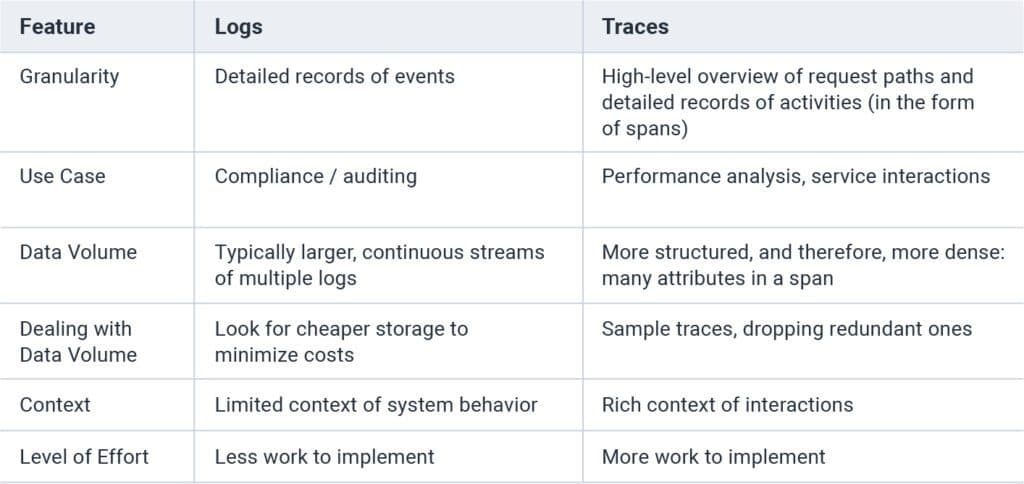
Logs vs traces: The main differences
This table shares the key differences between logs and traces.
Reference
https://www.honeycomb.io/blog/understanding-logs-vs-traces https://www.splunk.com/en_us/resources/videos/logs-and-metrics-and-traces-oh-my.html https://www.opensourceforu.com/2026/09/understanding-metrics-logs-and-traces-without-jargon/