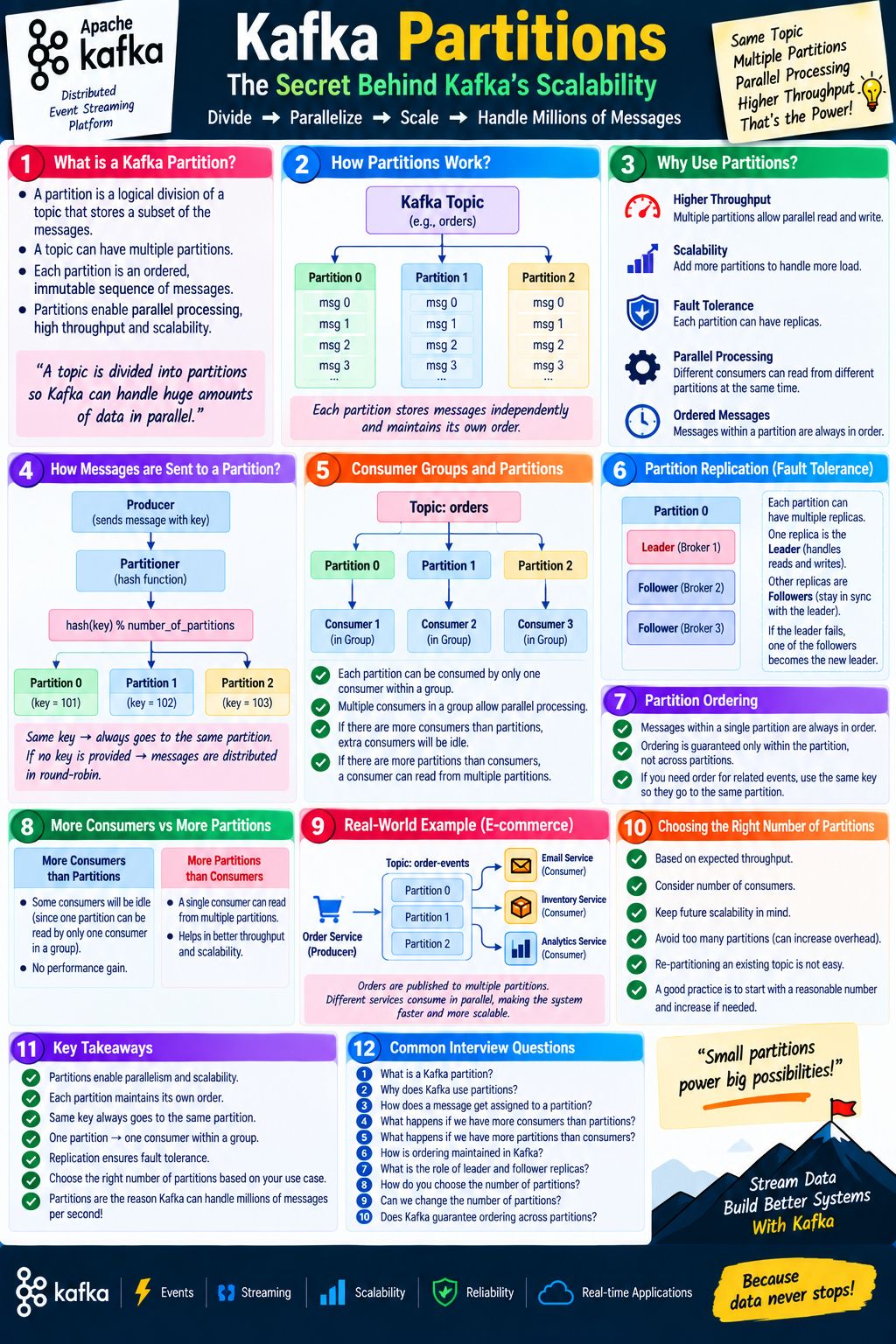
Question
- Does a producer send save message to different partitions of a topic? Topic has three partition P1 P2 P3 will message M1 will be stored in all these three different partitions
- It says here if there are more consumers than the number of partitions then extra consumer dies, but if there are more partitions than consumer then a single consumer can read for multiple partitions. But it also says that promo single consumer group only a single consumer can read from a partition. Which of these are true ?
- I have been asked about a message or drink guarantee in multiple interviews. Is there any other way to improve to make sure messages are ordered apart from using key ?
- give me a java and dot net code to achieve all these
1. Does a producer send a message to different partitions of a topic? Will message M1 be stored in all three partitions (P1, P2, P3)?
Answer:
NOTE
- No, a single message M1 will not be stored in all three partitions.
- When a producer sends a message to a Kafka topic, it typically goes to one specific partition based on either:
-
A Key: If a key is provided (e.g.,
producer.send(new ProducerRecord("topic", "key", "value"))), Kafka hashes the key to consistently route that specific key to the exact same partition (e.g., always P1). -
Round-Robin / Sticky Partitioner: If no key is provided, Kafka uses a round-robin or sticky partitioning strategy to distribute different messages across different partitions (P1, then P2, then P3, and so on). However, any individual message is only written to one partition.
-
- (Note: If you want a message copied to multiple places, you would typically use separate topics, not partitions).
2. Consumer-to-Partition Mapping: Which rule is true?
Answer: Both rules are true and describe different sides of Kafka’s consumer group architecture!
-
Rule 1 (Scaling limits): Within a single consumer group, one partition can only be read by one consumer at a time. Therefore, if you have 3 partitions (P1,P2,P3) and 5 consumers in the same group, 2 consumers will sit idle (they “die” or rather, receive no partitions to read from and remain inactive). Conversely, if you have 3 partitions and only 1 consumer, that single consumer will read from all 3 partitions.
-
Rule 2 (Exception to “extra consumers die”): If you want multiple consumers to read the exact same message stream independently, you put them in different consumer groups. Every consumer group gets its own independent copy of all messages from all partitions.
3. Are there other ways to ensure message ordering besides using a Message Key?
While using a Partition Key is the standard and most scalable way to guarantee ordering (because all messages with the same key go to the same partition, and partitions are strictly ordered), here are alternative or supplementary approaches:
-
Single Partition Topic: If your overall volume is low enough, you can set the topic to have only 1 partition. By definition, all messages go to that single partition, guaranteeing strict global ordering. (Downside: Kills horizontal scaling).
-
Application-Level Sequencing / Re-ordering Buffer:
- Send messages with a sequence number or timestamp.
- If messages arrive out of order at the consumer, the consumer holds them in a local buffer (like a priority queue or database) and only processes them once the missing preceding sequence numbers arrive.
-
Single-threaded Consumer Processing per Partition: Ensure that within your consumer application, the thread processing a partition processes messages sequentially and does not spin up asynchronous worker threads for messages from the same partition unless they maintain sequencing logic.
4. Java and .NET Code Implementation
Below are complete examples demonstrating:
- Producing messages with keys (to guarantee ordering per key).
- Consuming messages respecting the 1-to-1 consumer-to-partition rule within a group.
Java Implementation (using kafka-clients)
1. Producer Example:
import org.apache.kafka.clients.producer.*;
import org.apache.kafka.common.serialization.StringSerializer;
import java.util.Properties;

public class KafkaProducerExample {

    public static void main(String[] args) {
        Properties props = new Properties();
        props.put(ProducerConfig.BOOTSTRAP_SERVERS_CONFIG, "localhost:9092");
        props.put(ProducerConfig.KEY_SERIALIZER_CLASS_CONFIG, StringSerializer.class.getName());
        props.put(ProducerConfig.VALUE_SERIALIZER_CLASS_CONFIG, StringSerializer.class.getName());

        try (Producer<String, String> producer = new KafkaProducer<>(props)) {
            String topic = "my-ordered-topic";
            // Using a key ("order-123") ensures all messages for this key
            // go to the exact same partition, preserving strict order.
            String key = "order-123";
            for (int i = 1; i <= 3; i++) {
                String message = "Transaction Step " + i;
                ProducerRecord<String, String> record = new ProducerRecord<>(topic, key, message);
                producer.send(record, (metadata, exception) -> {
                    if (exception == null) {
                        System.out.printf("Sent: '%s' to Partition: %d, Offset: %d%n",
                                          message, metadata.partition(), metadata.offset());
                    } else {
                        exception.printStackTrace();
                    }
                });
            }
            producer.flush();
        }
    }
}
2. Consumer Example:
import org.apache.kafka.clients.consumer.*;
import org.apache.kafka.common.serialization.StringDeserializer;
import java.time.Duration;
import java.util.Collections;
import java.util.Properties;

public class KafkaConsumerExample {

    public static void main(String[] args) {
        Properties props = new Properties();
        props.put(ConsumerConfig.BOOTSTRAP_SERVERS_CONFIG, "localhost:9092");
        props.put(ConsumerConfig.GROUP_ID_CONFIG, "my-consumer-group"); // Enforces 1 consumer per partition rule
        props.put(ConsumerConfig.KEY_DESERIALIZER_CLASS_CONFIG, StringDeserializer.class.getName());
        props.put(ConsumerConfig.VALUE_DESERIALIZER_CLASS_CONFIG, StringDeserializer.class.getName());
        props.put(ConsumerConfig.AUTO_OFFSET_RESET_CONFIG, "earliest");

        try (Consumer<String, String> consumer = new KafkaConsumer<>(props)) {
            consumer.subscribe(Collections.singletonList("my-ordered-topic"));
            System.out.println("Consumer started. Waiting for messages...");
            while (true) {
                ConsumerRecords<String, String> records = consumer.poll(Duration.ofMillis(100));
                for (ConsumerRecord<String, String> record : records) {
                    System.out.printf("Received -> Key: %s, Value: %s, Partition: %d, Offset: %d%n",
                            record.key(), record.value(), record.partition(), record.offset());
                }
            }
        }
    }
}
.NET (C#) Implementation (using Confluent.Kafka)
Prerequisite: Install the NuGet package Confluent.Kafka
1. Producer Example:
using System;
using Confluent.Kafka;
class Program
{
    public static async Task Main(string[] args)
    {
        var config = new ProducerConfig { BootstrapServers = "localhost:9092" };
        using var producer = new ProducerBuilder<string, string>(config).Build();
        string topic = "my-ordered-topic";
        string key = "order-123"; // Key guarantees routing to the same partition
        for (int i = 1; i <= 3; i++)
        {
            string val = $"Transaction Step {i}";
            try
            {
                var deliveryResult = await producer.ProduceAsync(topic, new Message<string, string> { Key = key, Value = val });
                Console.WriteLine($"Delivered '{deliveryResult.Value}' to '{deliveryResult.TopicPartitionOffset}'");
            }
            catch (ProduceException<string, string> e)
            {
                Console.WriteLine($"Delivery failed: {e.Error.Reason}");
            }
        }
    }
}
2. Consumer Example:
using System;
using System.Threading;
using Confluent.Kafka;
class ConsumerProgram
{
    public static void Main(string[] args)
    {
        var conf = new ConsumerConfig
        {
            GroupId = "my-consumer-group", // Enforces the partitioning rules
            BootstrapServers = "localhost:9092",
            AutoOffsetReset = AutoOffsetReset.Earliest
        };
        using var c = new ConsumerBuilder<string, string>(conf).Build();
        c.Subscribe("my-ordered-topic");
        CancellationTokenSource cts = new CancellationTokenSource();
        Console.CancelKeyPress += (_, e) => {
            e.Cancel = true;
            cts.Cancel();
        };
        try
        {
            while (true)
            {
                try
                {
                    var cr = c.Consume(cts.Token);
                    Console.WriteLine($"Consumed message '{cr.Message.Value}' at: '{cr.TopicPartitionOffset}'.");
                }
                DconsumeException e)
                {
                    Console.WriteLine($"Error occured: {e.Error.Reason}");
                }
            }
        }
        catch (OperationCanceledException)
        {
            c.Close();
        }
    }
}
Question
- The order ID you have used in your example seems ready general it is order 123 but what if I want to have message or drink for different orders. Give me a real world example on how the key would be decided
- What is this property what does it do - AutoOffsetReset = AutoOffsetReset.Earliest or props.put(ConsumerConfig.AUTO_OFFSET_RESET_CONFIG, “earliest”);
1. Real-World Examples of Choosing a Partition Key
NOTE
Choosing the right key is the secret sauce to making it work in production!) In a real-world application, you don’t hardcode a static key like
"order-123". Instead, you dynamically extract a unique identifier from the incoming event data.
The golden rule is: All messages that belong to the same logical entity must share the same key.
Here are three common real-world scenarios:
-
E-Commerce (Shopping Cart / Orders):
- Key:
order_id(e.g.,"ORD-98765"). - Why: Every lifecycle event for that specific order—
OrderCreated,PaymentSuccess,ItemPacked,OrderShipped—must be processed in exact order. IfItemPackedprocesses beforeOrderCreated, your system will break. Usingorder_idensures all events for Order A go to Partition 1, all events for Order B go to Partition 2, and so on, keeping orders independent while preserving strict internal order.
- Key:
-
Ride-Sharing (Uber/Lyft):
- Key:
driver_id(e.g.,"driver_8892"). - Why: GPS coordinates and status updates (
EnRoute,Arrived,TripStarted) sent by a driver’s phone must be processed sequentially. You don’t care if Driver A’s updates get processed before Driver B’s, but Driver A’s updates must stay in order.
- Key:
-
Banking / Fintech:
- Key:
account_idorcustomer_id(e.g.,"acc_55412"). - Why: Deposits and withdrawals for a specific bank account must be processed sequentially to calculate the correct balance accurately.
- Key:
1. Dynamic Key in Code
Instead of a fixed string, you pull the key from the payload:
// Java example: Dynamic key based on the order object
String key = incomingOrder.getOrderId();
ProducerRecord<String, String> record = new ProducerRecord<>(topic, key, incomingOrder.toJson());
2. What does AutoOffsetReset = AutoOffsetReset.Earliest do?
An offset is simply a sequential integer ID that Kafka assigns to every message as it arrives in a partition (e.g., message 0, message 1, message 2…). Kafka consumers track their progress by remembering the last offset they successfully read.
The auto.offset.reset property tells Kafka what to do when a consumer starts up and finds NO saved/committed offset for its consumer group. This typically happens in two scenarios:
- It is a brand-new consumer group running for the very first time.
- The consumer group’s previous offsets have expired (cleaned up by Kafka retention policies).
The Options:
earliest: The consumer will start reading from the very beginning of the partition (offset 0, or the oldest message currently retained on disk).- Use case: When you want to process historical data or ensure you don’t miss any messages that arrived while your application was offline.
latest(Default in many setups): The consumer will ignore all existing messages and only start reading brand new messages produced after the consumer starts up.- Use case: Real-time monitoring dashboards where you only care about live data happening right now and historical data is irrelevant.
none: Throws an exception to the consumer if no previous offset is found, forcing you to handle it manually.
Question
- Let’s say I have notification message, i want to send it to email notification and sms notification services.
- How will these services be grouped in a consumer groups ?
- Will they both be a part of a same consumer group or will they we different consumer group as the different service ?
- I had ask this question earlier to if a consumer group should have nodes of a single services as different consumers or different services can be part of a single consumer group but in the latter scenario I am confused, won’t messages be missed as each partition can have only one consumer.
- How is it handle in production
TODO: ^1
Merge z. Choice A and z. Choice B
Q
Question
- One each consumer group managers of set. Isn’t there a risk of losing data if kafka or broker dies suddenly, before kafka could save the offset ?
- Who takes care of committing this of sir. Is it done by kafka broker or done by consumer group ? Give me code example in both in Java and.net
- Where is this offset saved ?
- How will I decided a topic ? do they adhere to a single kind of message such as order created or payment process or can I mix and match them ?
- You mentioned that each consumer group will have multiple pods of a given service. How will I know the size of consumer group beforehand ? for example if I am using k8 for deployments then, I think I should be able to know how many nodes will be deployed, but but as a developer that is not my task.
- What if someone from devops teamchanges the node size. Let’s say I have 10 nodes in production but in my consumer group I had only hardcoded 4. What if they devops team reduced it to 3. How will I manage this dynamic nodes of a service for a consumer group.
- Give me the code for the same. Or is it kafka who takes care of it automatically ?
1. Risk of Losing Data if Kafka Dies Before Saving the Offset?
- The Risk:
- If your consumer processes a message but crashes before the offset is committed, Kafka doesn’t know it was processed.
- When the consumer restarts, it will re-read that message.
At-least-once delivery
This leads to at-least-once delivery (duplicate processing), which is standard in event-driven systems. Your code should ideally be idempotent (safe to process the same message twice).
- Broker Reliability:
- Offsets are saved in a highly replicated internal topic. As long as your Kafka cluster has a replication factor greater than 1, a single broker dying will not lose your offsets.
2. Who Commits Offsets & Where Are They Saved?
- Who commits: The consumer application tracks and commits the offsets. It can do this automatically in the background or manually via your code.
- Where are they saved: Offsets are saved in a special internal Kafka topic called
__consumer_offsets, which is managed by the Kafka brokers.
Code Example: Manual Offset Committing
Manual committing gives you precise control (only commit after your business logic successfully runs).
props.put(ConsumerConfig.ENABLE_AUTO_COMMIT_CONFIG, "false"); // Disable auto-commit

while (true) {
    ConsumerRecords<String, String> records = consumer.poll(Duration.ofMillis(100));
    for (ConsumerRecord<String, String> record : records) {
        // Process your business logic here (e.g., save to DB)
        processMessage(record);
    }
    consumer.commitSync(); // Manually commit offsets for all records in the batch
}
var conf = new ConsumerConfig {
GroupId = "my-consumer-group",
BootstrapServers = "localhost:9092",
EnableAutoCommit = false // Disable auto-commit
};
using var c = new ConsumerBuilder<String, String>(conf).Build();
c.Subscribe("my-ordered-topic");
while (true) {
var cr = c.Consume();
// Process business logic
ProcessMessage(cr.Message);
try {
c.Commit(cr); // Manually commit current offset
} catch (KafkaException e) {
Console.WriteLine($"Commit error: {e.Error.Reason}");
}
}3. Topic Design: Single Message Type vs. Mix and Match?
- Best Practice: One message type per topic (or strictly related domain events, like
order-events). - Why avoid mixing? If you mix unrelated messages (e.g., pushing
OrderCreated,UserSignedUp, andPaymentProcessedinto a single topic), downstream consumers will face massive complexity trying to filter out messages they don’t care about, schemas will clash, and ordering guarantees will get ruined.
4. How Does Kafka Handle Dynamic Kubernetes Scaling Automatically?
-
You do not hardcode consumer node counts in your app code.
-
When you deploy your service to Kubernetes (e.g., 4 pods, or scaled up to 10 pods, or scaled down to 3 pods), Kafka handles it completely automatically using a process called Consumer Rebalancing.
-
How it works:
- Every pod runs an identical consumer instance sharing the same
group.id. - When a new pod spins up or an old pod dies, Kafka detects the cluster change.
- Kafka pauses consumption briefly, redistributes the partitions evenly among the currently active pods, and resumes.
- Therefore, if DevOps scales your app from 4 nodes to 3 nodes, Kafka simply reassigns the leftover partitions to the remaining 3 active pods. No code changes are required from you!
- Every pod runs an identical consumer instance sharing the same
Q
Questions
- Consumer rebalancing - Is it all manual or do I need to intervene as a developer?
- How does Kafka rebalance it?
- An interview question on consumer group rebalancing.
1. Consumer Rebalancing: Is it Manual or Automatic?
It is completely automatic. As a developer, you do not need to write custom scripts or manually step in when pods scale up or down in Kubernetes. Kafka’s broker-side Group Coordinator and the consumer client library manage the entire lifecycle of detecting changes, revoking old assignments, and mapping new ones.
2. How Does Kafka Rebalance?
Kafka handles rebalancing via a coordinated protocol between the consumers and a designated broker acting as the Group Coordinator.
- Detection: Every consumer sends regular heartbeats to the Group Coordinator. If a consumer pod dies, stops responding, or if a new pod spins up and joins the group, heartbeats change, triggering a rebalance.
- The Protocol (Cooperative vs. Eager):
- Legacy (Eager / Stop-the-World): All consumers in the group would instantly stop consuming, drop all their partition assignments, and restart the assignment process from scratch. This caused a temporary total blackout in data processing.
- Modern (Cooperative Sticky Assignor - Default in modern clients): Uses an incremental/cooperative approach. Only the specific partitions that need to shift from one consumer to another are reassigned. Consumers who aren’t impacted keep processing messages uninterrupted.
3. A Common Interview Question on Consumer Group Rebalancing
Interview Question: “Suppose you have a Kafka topic with 4 partitions and a consumer group running 2 consumer instances (
and ). Each consumer handles 2 partitions. Suddenly, you scale your deployment up to 5 consumer instances ( through ). What happens, and how many consumers are actively working?”
Answer Breakdown:
- The Core Rule: A single partition can only be read by one consumer within a group at a time, and a consumer can read from multiple partitions, but zero consumers can have 0 partitions if there are more consumers than partitions.
- The Result:
- Since there are only 4 partitions available, Kafka will assign 1 partition each to 4 of the consumers (e.g.,
through ). - The 5th consumer (
) will remain idle (extra consumer sits without any partition assignment).
- Since there are only 4 partitions available, Kafka will assign 1 partition each to 4 of the consumers (e.g.,
- Key Takeaway for Interviews: Scaling your pods beyond the number of topic partitions yields zero performance or scaling benefits; those extra pods will simply stay idle as warm standbys until a partition count increases or an active consumer crashes.