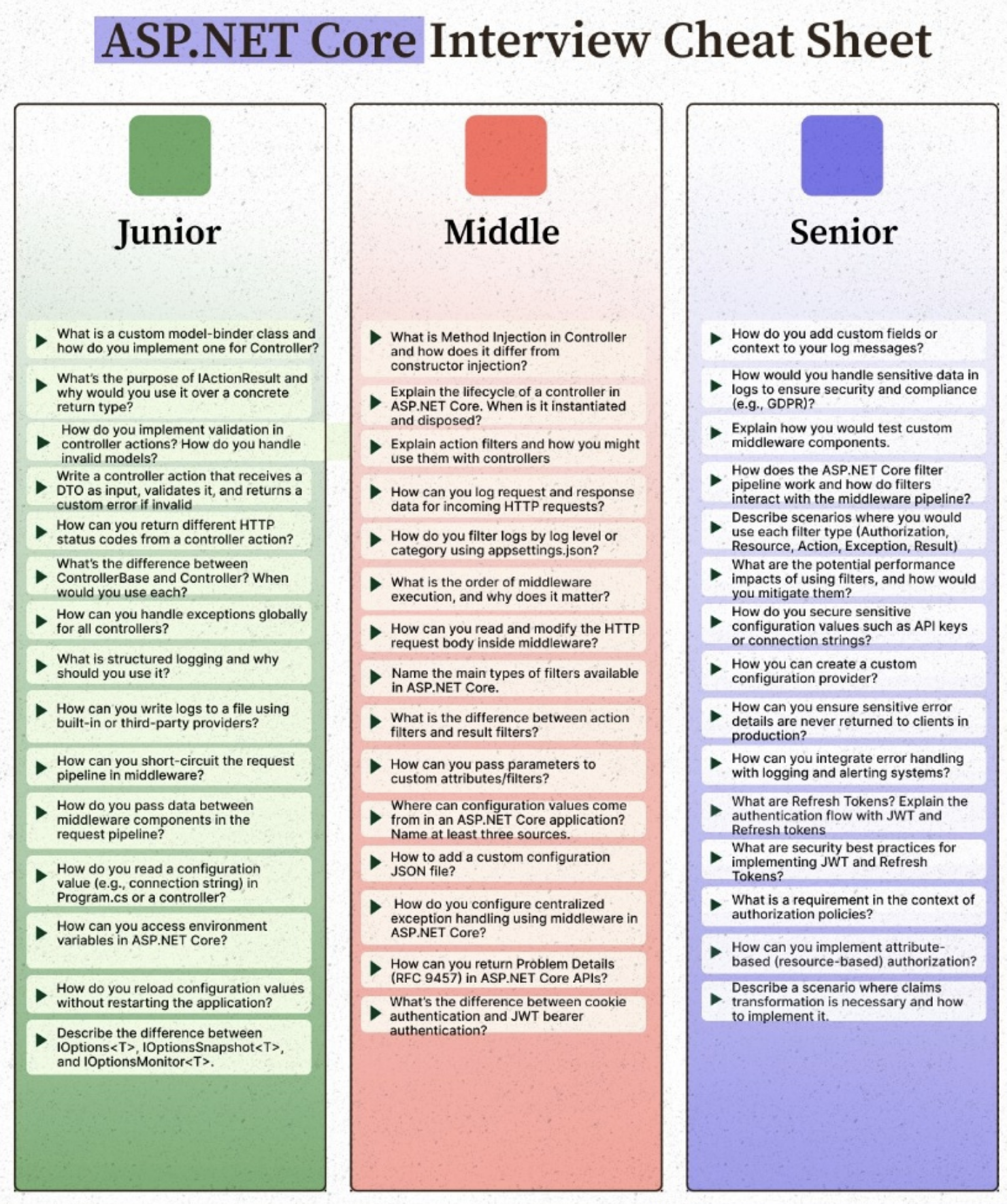
Legacy .NET Framework vs. Modern .NET (ASP.NET Core)
Before diving into specific technical questions, it is critical to distinguish between Legacy .NET Framework (ASP.NET MVC / WCF / ASMX) and Modern .NET (ASP.NET Core .NET 6/8/9+).
| Feature / Concept | Legacy (.NET Framework / ASP.NET MVC) [Legacy] | Modern (.NET / ASP.NET Core) [ Modern] |
|---|---|---|
| Hosting & Runtime | Tied to Windows & IIS (System.Web.dll). Heavy, tightly coupled. | Cross-platform (Windows, Linux, macOS), lightweight Kestrel web server. |
| Dependency Injection | Third-party containers required (Ninject, Autofac, Castle Windsor). | Built-in, first-class IoC container (IServiceCollection). |
| Configuration | XML-based (web.config, appSettings, system.web). | JSON-based (appsettings.json), environment variables, strongly typed options. |
| Middleware & Pipeline | Global.asax and HttpModules/HttpHandlers. Complex lifecycle events. | Modular Middleware pipeline configured via WebApplication builder pattern in Program.cs. |
| Exception Handling | Application_Error in Global.asax, HandleErrorAttribute. | IExceptionHandler interface (introduced in .NET 8), middleware, RFC 9457 ProblemDetails. |
Junior-Level Core Concepts
1. What is the difference between ControllerBase and Controller? When would you use each?
ControllerBase: Does not include support for views. It is designed for RESTful Web APIs where you return JSON, XML, or status codes (inherits API-specific helpers likeOk(),BadRequest()).Controller: Inherits fromControllerBaseand adds support for HTML Views (View(),PartialView()), layout pages, and MVC view-bag data.- When to use: Use
ControllerBasefor modern Web APIs / Microservices; useControlleronly if your application serves traditional server-rendered HTML pages (Razor views).
2. How can you handle exceptions globally for all controllers?
- Modern Approach (.NET 8+): Implement the
IExceptionHandlerinterface and register it viabuilder.Services.AddExceptionHandler<T>()andapp.UseExceptionHandler(). - Legacy / Standard Middleware Approach: Use the built-in exception handling middleware (
app.UseExceptionHandler("/error")) which catches unhandled exceptions globally and redirects execution to an error-handling endpoint.
3. How do you read a configuration value (e.g., connection string) in Program.cs or a controller?
- In
Program.cs: Access viabuilder.Configuration["ConnectionStrings:DefaultConnection"]orbuilder.Configuration.GetConnectionString("DefaultConnection"). - In Controllers / Services: Inject
IConfigurationvia constructor injection, or use the strongly typedIOptions<T>/IOptionsSnapshot<T>pattern.
Middle-Level Architecture & Pipeline
1. Explain the order of middleware execution, and why does it matter?
Middleware executes in the exact sequential order in which they are added to the pipeline in Program.cs (forming a onion-like execution wrapper).
graph TD
    Req[Incoming Request] --> Ex[Exception Middleware]
    Ex --> Route[Routing Middleware]
    Route --> Auth[Auth & Security]
    Auth --> Ctrl[Controller Action]
    Ctrl --> Auth
    Auth --> Route
    Route --> Ex
    Ex --> Resp[Outgoing Response]
- Why order matters: If you place
UseAuthorizationbeforeUseRouting, authentication/authorization rules won’t know which endpoint is being targeted because routing hasn’t resolved the path yet!
2. Name the main types of filters available in ASP.NET Core, and difference between Action and Result filters?
ASP.NET Core has five primary filter types executed in a specific pipeline order:
- Authorization Filters (Run first, check permissions).
- Resource Filters (Run right after auth, can short-circuit the pipeline).
- Action Filters (Run immediately before and after the action method execution).
- Exception Filters (Handle unhandled exceptions thrown during action execution).
- Result Filters (Run only when the action result is about to execute, e.g., formatting JSON).
- Action vs. Result Filters: Action filters wrap the execution of the action method itself (accessing arguments and return values), whereas Result filters wrap the execution of the
IActionResult(e.g., modifying the serialized JSON payload right before it hits the wire).
3. How do you return Problem Details (RFC 9457) in ASP.NET Core APIs?
Modern ASP.NET Core has built-in support for standardized error payloads. You can return standard RFC 9457 responses using controller helper methods:
return Problem(
    detail: "The transaction amount exceeds the limit.",
    statusCode: StatusCodes.Status400BadRequest,
    title: "Invalid Transaction"
);
Senior-Level Design & Security
1. How does the ASP.NET Core filter pipeline interact with the middleware pipeline?
- Middleware operates at the global HTTP server level (
IServer, Kestrel) handling raw bytes, requests, headers, and routing for every request (including static files, health checks, etc.). - Filters operate strictly within the MVC / Endpoint execution context. They only execute after routing has matched the request to a specific controller action. Think of filters as “action-scoped middleware.”
2. What are Refresh Tokens? Explain the authentication flow with JWT and Refresh tokens.
- JWT (Access Token): Short-lived token (e.g., 15 minutes) containing claims. Validated statelessly by API microservices.
- Refresh Token: Long-lived, opaque token stored securely in the database (linked to a user session).
- Flow:
- User logs in with credentials.
- Server returns both a short-lived JWT and a long-lived Refresh Token.
- When the JWT expires, the client sends the Refresh Token to
/api/auth/refresh. - Server validates the refresh token against the database, issues a new JWT, and optionally rotates the refresh token for security.
3. Describe a scenario where claims transformation is necessary and how to implement it.
- Scenario: Your JWT token only contains a basic user ID claim, but your authorization policies need to check database roles or organization-specific permissions on every request without bloating the JWT payload size.
- Implementation: Implement
IClaimsTransformationto intercept authentication and enrich theClaimsPrincipalwith extra database claims on the fly.
public class AdditionalClaimsTransformer : IClaimsTransformation
{
    public async Task<ClaimsPrincipal> TransformAsync(ClaimsPrincipal principal)
    {
        // Add custom claims from database lookup if not already present
        return principal;
    }
}